AutoCAD plugins for electrical schematics, drawings and planning. Designed in Switzerland for engineering offices and installers.Electrical plugins for AutoCAD
Conçu en Suisse AutoCAD 2025 & 2026 Installation en 2 min
1187 IEC 60617 symbols
PDF export · 2 min
NIBT 2020 · CAN
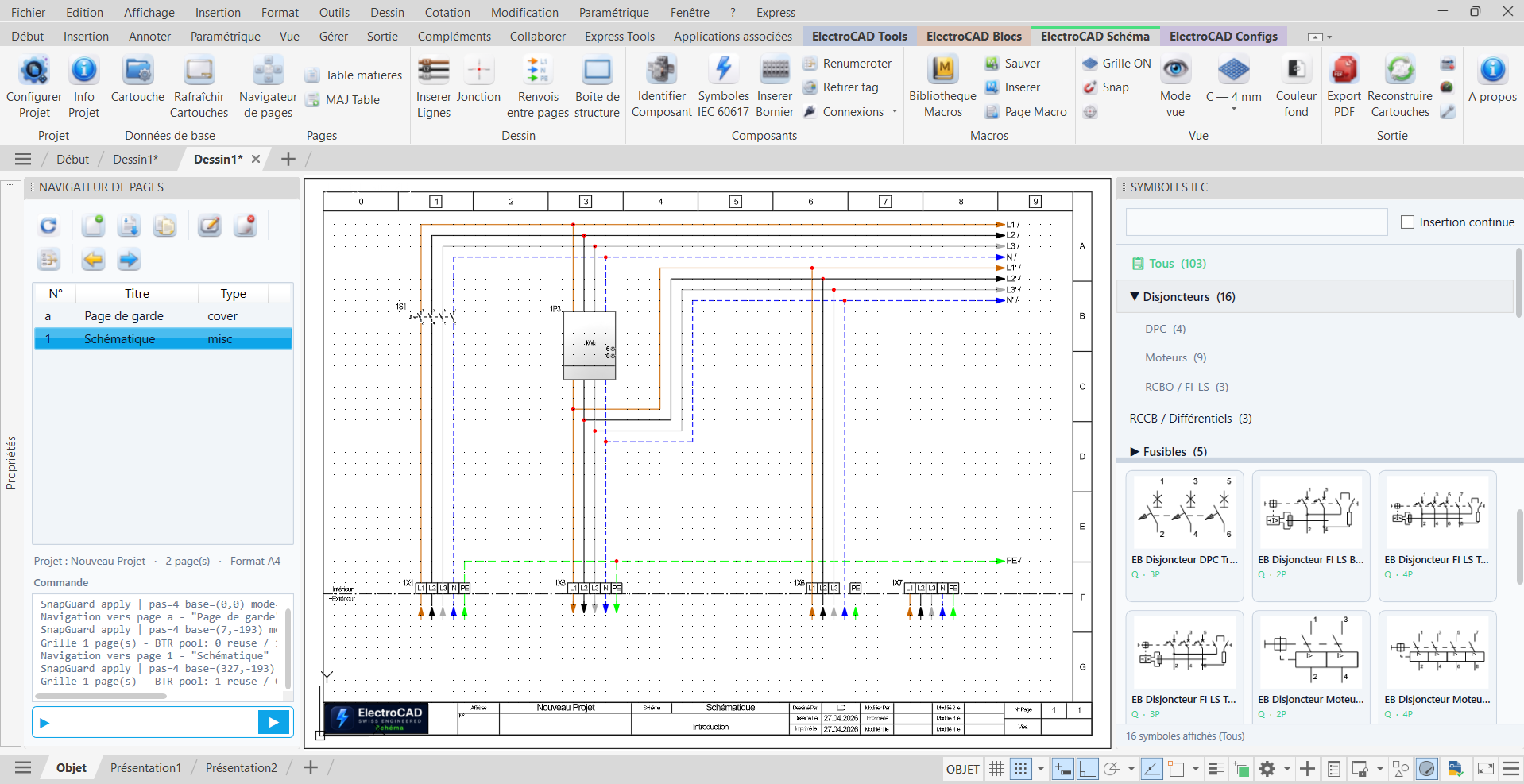
ElectroSchema — AutoCAD
Schematic ribbon
EBFIND palette
Legend generator
Layout generator
Blocks ribbon
ElectroCAD tools
Schematic ribbon
EBFIND palette
Legend generator
Layout generator
Blocks ribbon
ElectroCAD tools
IEC symbol searchNew pageInsert title blockCablesInsert terminal stripIdentify componentCross-references between pagesJunctionInsert linesRenumberTable of contentsMacro libraryPage navigatorBatch PDF exportCopy propertiesCopy attributesSelect similarReplace blocksRadical purgeExpress cleanerLuminaire layoutMaterial list for quotesDynamic copyLight or dark backgroundRebuild title blocks
IEC symbol searchNew pageInsert title blockCablesInsert terminal stripIdentify componentCross-references between pagesJunctionInsert linesRenumberTable of contentsMacro libraryPage navigatorBatch PDF exportCopy propertiesCopy attributesSelect similarReplace blocksRadical purgeExpress cleanerLuminaire layoutMaterial list for quotesDynamic copyLight or dark backgroundRebuild title blocks
Why
One single goal: to save you time on every drawing.
ElectroCAD automates the repetitive tasks of electrical design in AutoCAD. Fewer clicks, fewer errors, more productivity — without changing tools.
5×
Symbol insertion faster
0
Error in numbering
2 min
For an export Complete PDF
−30%
Of clicks per average project
Who it's for
Designed for professionals who draw on a daily.
ElectroCAD was designed in the field, with and for Swiss installers, draftsmen and engineering offices.
01 / Engineering office
Execution drawings & single-line diagrams
You produce working drawings, single-line diagrams and material lists. ElectroCAD standardizes your production and cuts drawing time in half.
02 / Installer
Standalone site drawings
You draw your own plans on top of site work. Ready-to-use library, pre-configured trade layers, clean PDF export with zero hassle.
03 / Draftsman
Accelerated CAD production
You spend your days in AutoCAD. ElectroCAD eliminates repetitive tasks. More time for design, less for click mechanics.
The modules
Three modules. Choose what you need.
Each module solves a specific problem. Take them separately — or as the complete Ultimate suite.
M—01 / Tools
ElectroCAD Tools
50 tools · productivity for Swiss professionals
Productivity toolbox for AutoCAD. Every command solves a real everyday problem.
Cable sizing according to the Swiss NIBT 2020 standard with 11 installation methods and voltage drop calculation
Automatic luminaire layout in 23 architectural patterns compliant with EN 12464-1
Visual comparison between two versions of a drawing with PDF export of the revision
Copy objects between DWG files with rotation and coordinate system compensation
Drawing legend generated automatically from the blocks actually present
Preconfigured dimensioning in millimeters and centimeters with presets saved per project
Cleanup in 18 modes and radical multi-pass purge with no risk to your attributes
One-click selection of all similar objects based on 7 combinable criteria
Batch block replacement preserving attributes, rotation and dynamic properties
Export all your layouts to PDF in a single batch
Bill of materials exported to a spreadsheet for quotes
Plus over 35 additional commands for everyday work
If you cannot find the answer here, write to us at info@electrocad.ch — reply within 24 business hours.
Which AutoCAD version is required?
AutoCAD 2025, 2026 et 2027 (version complète) ou AutoCAD LT 2025, 2026 et 2027. Windows 10 ou 11, architecture 64 bits. L'installateur détecte automatiquement votre version et installe le module adapté.
Do my DWG files remain compatible?
Yes, 100 %. ElectroCAD uses standard AutoCAD blocks and layers. Your files can be read by anyone, even without ElectroCAD installed.
Can I try before buying?
30-day free trial with all features included. No credit card. No commitment. At any time, you can switch to a paid subscription or do nothing — the trial simply ends.
How do updates work?
Automatically. You receive a notification in AutoCAD at startup. One click on ECUPDATE installs the new version. Your files and settings are preserved.
Can I work offline?
Yes, up to 14 days without a connection. Only the license heartbeat (every 5 min) requires an occasional connection. Beyond 14 days, ElectroCAD switches to read-only mode until you reconnect.
What is the difference between the three modules?
Tools = AutoCAD productivity tools. Blocks = IEC symbol library. Schema = complete multi-page electrical schematics. The Ultimate combines all three — that's what 80 % of our clients choose.
Is support really in French?
Yes. Team based in Switzerland, French-language reply within 24 business hours by email (info@electrocad.ch). Pro and Ultimate subscribers can also book a phone call by appointment.
Get started
Ready to speed up your drawings?
30-day free trial. All features. No credit card. You decide afterwards — not before.